New feature
Add titles from any app
Android 1.9.0 and later.
See a film or show in another app on your Android phone? Share it to OnTheList, and it is on your list before you leave the app you were in.
Share from any app
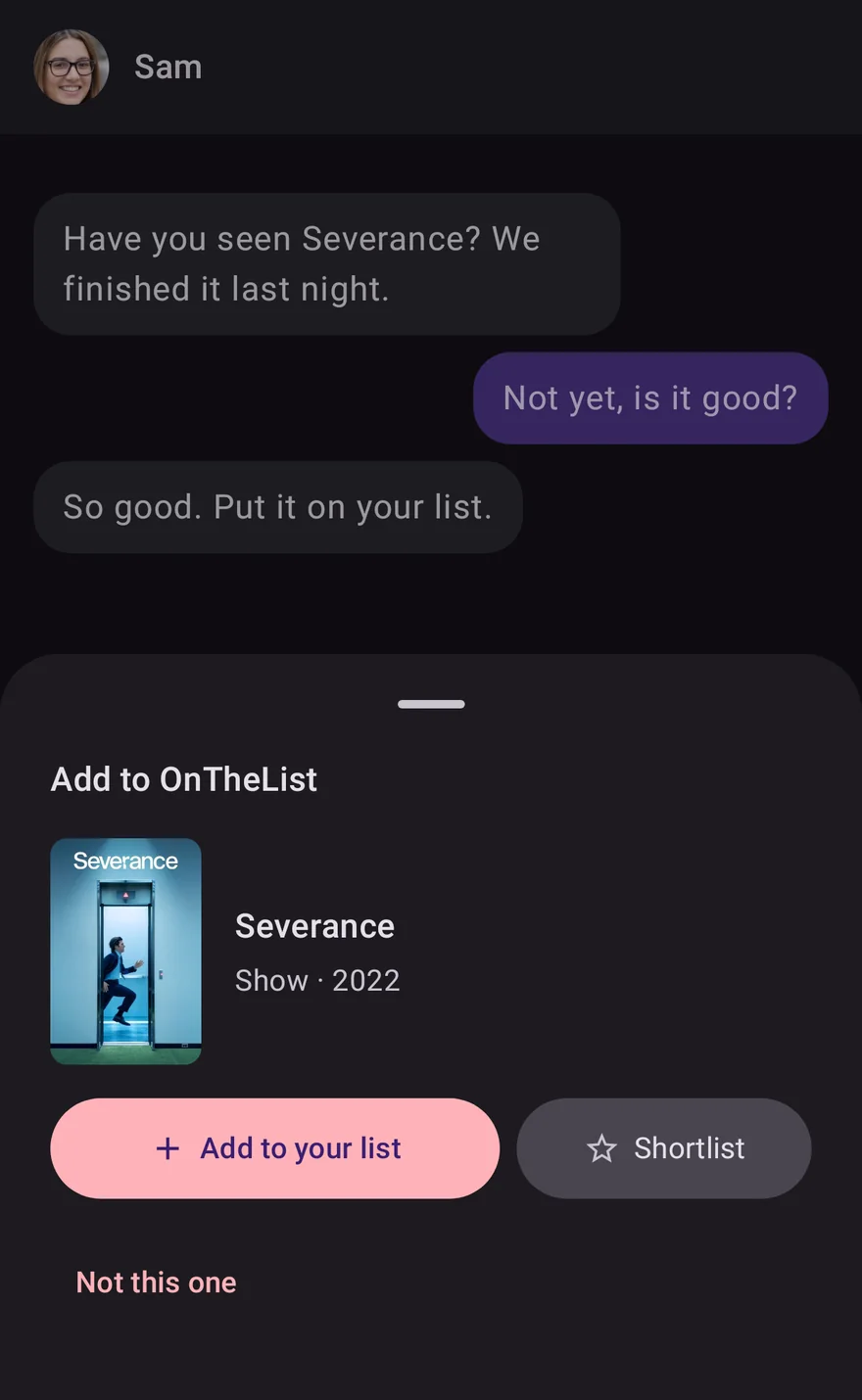
In any app with a Share button, choose Add to OnTheList. It works with a link to a clip, a trailer or a web page, with a message that names a film or show, and with a screenshot. A small sheet opens over the app you are in, finds the title, and shows its poster and name. Choose Add to your list or Shortlist, and you are back where you were.
If it found the wrong one, choose Not this one to see the other matches, or search. A message or a screenshot with several titles in it becomes a list you can review and add together.
Select a name and add it
Select the name of a film or show in any text, and the menu that appears offers Add to OnTheList. The same sheet opens with the title found.
Screenshots stay on your phone
When you share a screenshot or photo, the words in it are read on your phone. The picture is never stored or uploaded. Reading pictures works only while Share app statistics is on in Settings. When it is off, the sheet says so and offers to open Settings.
Remember where it came from
A title added this way shows a short line on its page, such as From a TikTok, From a YouTube video or From a message. Choose a link line to open the clip or page again. A title you added from a friend's list shows From and their name instead.