New feature
Pair a Google TV
Android 1.8.0 and later. iPhone and iPad 1.3.7 and later.
Install OnTheList on your Google TV or Android TV, pair it with your phone, and your list appears on the big screen.
Get OnTheList on your TV
Install OnTheList from Google Play on your Google TV or Android TV. The TV shows a code and a QR code.
Pair the TV with your phone
On your phone, open OnTheList, then Settings, then Devices. On Android, choose Pair a TV. On an iPhone, choose Add TV. Then enter the code the TV shows. Or scan the QR code on the TV with your phone's camera.
If your list uses a Google account, you can choose Continue with Google on the TV instead. There is no password to type with the remote.
Your list on the big screen
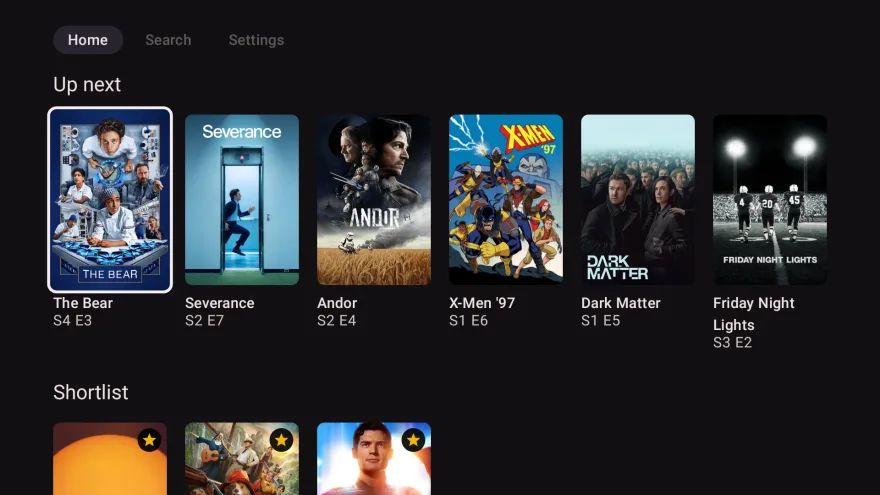
The TV shows your list the way the phone does: Up next, what's streaming now and what's coming next. Choose a title to see where to watch it, and open the streaming app that has it.
Share the TV with the people you live with
On the TV, open Settings, then Add a person. They enter the code in the OnTheList app on their phone. Then use Who's watching to see one person's list, or everyone's together. On both your lists shows what you both want to watch.
Unpair the TV at any time
On the TV, open Settings, then Unpair this TV. Or on your phone, open Settings, then Devices, and unpair the TV there. The TV then stops showing your list.